 ColorPairLab
How to Make a Website Color Reference Sheet
Pair a portable swatch card with a short table of text and background uses. Sage Notebook provides the colors for this small website reference.
Sage Notebook · portable reference
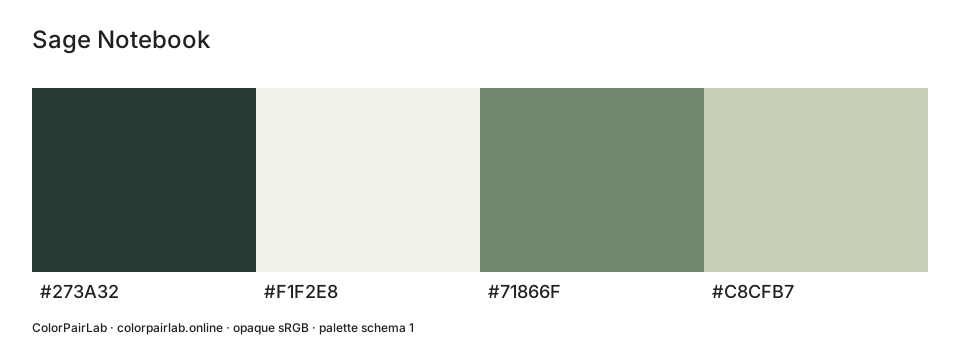
This SVG uses the same export format as the palette builder.
A quieter place to read.
Choose text for the background it sits on. Switching the app theme leaves these palette values unchanged.
- Body text on page surface
- 10.71:1
- A note beside the story
- 7.52:1
These previews check the selected text pairs. Review focus, borders and interaction in the finished component.
A color reference should be quick to open and clear enough to use without the original design file. An SVG card identifies the values; a short contrast table explains where they belong. We will make both from Sage Notebook.
Choose the colors the site really uses
| Swatch | Exact value | Proposed reference role |
|---|---|---|
| Swatch 1 | #273A32 | Body and heading ink |
| Swatch 2 | #F1F2E8 | Main page surface |
| Swatch 3 | #71866F | Secondary accent candidate |
| Swatch 4 | #C8CFB7 | Supporting note surface |
Include the colors the site currently uses. Extra alternatives make it harder to know which ones to implement. Sage Notebook is the name of this palette; the hex values identify its individual colors.
Export a scalable swatch card
Open the palette in the builder, check its name and swatch order, then choose Download SVG. The vector card has labeled color values and scales cleanly in a compatible browser or design app. It is generated from the current palette in your browser.
Open the file before sharing it. Check that the title is readable and that all four labels match the table. Names containing punctuation should still appear as plain text.
Add the text and background pairs
| Reference specimen | Text | Background | Ratio | AA normal |
|---|---|---|---|---|
| Reading paragraph | #273A32 | #F1F2E8 | 10.71:1 | Pass |
| Note panel | #273A32 | #C8CFB7 | 7.52:1 | Pass |
| Accent candidate | #71866F | #F1F2E8 | 3.48:1 | Fail |
For each chosen pair, record the result and the text size it applies to. A swatch card gives you the colors; the pair table tells you how they are used. Mark a failed caption candidate as needing revision rather than presenting it as ready for use.
Show the colors in a small layout
.reference-reading {
  color: #273A32;
  background: #F1F2E8;
}
.reference-note {
  color: #273A32;
  background: #C8CFB7;
}
Add a heading, a short paragraph and a note panel at realistic sizes. This shows the scale and density of the page more clearly than a large alphabet sample. Include a separate pair for any dark section.
Keep the card with its source files
- Save JSON as the editable palette source.
- Give the SVG and CSS the same revision name.
- Attach the chosen pairs, text categories and contrast results.
- Regenerate the related files whenever a swatch changes.
Keep JSON so a colleague can reopen the palette instead of reading values from the SVG. A browser collection is useful while working, but download a backup before clearing data or changing computers.
Note what still needs review
This reference does not cover print matching or guarantee the same appearance on every display. Add separate checks for hover states, borders, focus indicators and text over images wherever the site uses them.
Sources and further reading
Content reviewed: October 22, 2026